CAIE ICT (0417) Notes
Module 1: Advanced Hardware & Storage Mechanics
Understanding internal structures and computing baselines is vital for distinguishing system behaviors and structural performance limits.
1.1 RAM vs. ROM Core Architectural Differentiation
| Characteristic | Random Access Memory (RAM) | Read Only Memory (ROM) |
|---|---|---|
| Volatility | Volatile (Data completely lost immediately when system power cycle drops). | Non-Volatile (Permanent storage properties; retains configuration profile state indefinitely). |
| Mutability | Can be written to and read from. | Read-only access execution. |
| Primary Function | Store data temporarily. | Store BIOS. |
| Storage Capacity | Larger storage capacity. | Smaller storage capacity. |
1.2 Secondary Storage Categories & Functional Underpinnings
Secondary storage systems operate via three primary mechanical categories. Selecting the right category depends on spatial constraints, access latency targets, and budget boundaries:
- Magnetic Media (HDD, Magnetic Tape): Operates via read/write magnetic heads polarizing sections of a rotating platters stack. High structural capacity per currency unit, but prone to mechanical shock anomalies and slower track-seek latencies.
- Optical Media (CD, DVD, Blu-Ray): Relies on laser optical tracking engines reading pits and lands configurations across reflective surfaces. Highly resilient to electronic interference, but yields low spatial ceilings and high write deterioration scores.
- Solid-State Media (SSD, NVMe, Flash Drives): Utilizes non-volatile NAND flash memory chips containing floating-gate transistors. Boasts extreme input/output processing operations per second, absence of moving parts, low power draw metrics, and minimal access seek delays.
Module 2: Network Topologies, Protocols & Security Infrastructure
Networks allow complex node communications but introduce structural exposure risks that require deliberate protection patterns.
2.1 Network Types Comparison Matrix
| Network Model | Coverage (Where is it used?) | Infrastructure (Who owns the cables?) |
|---|---|---|
| LAN (Local Area Network) | Covers a small area, like a single building, school, or office. | Owned by the organization. Uses standard cables or fiber optics. |
| WLAN (Wireless LAN) | Covers a local area using radio waves (Wi-Fi) instead of cables. | Wireless connection. Walls can block the signal, and it is less secure. |
| WAN (Wide Area Network) | Covers a very large area, like a country, continent, or the whole world. | Uses leased telephone lines, undersea cables, and satellites. |
Network Hardware Components
-
Router:
- Allows a LAN to be connected to a WAN/Internet.
- Allows data packets to be sent to LAN/WAN.
-
Hub:
- Connects computers/devices so data can be broadcast to all devices.
- Expands a LAN.
-
Network Interface Card (NIC):
- Connects computers/devices to a network.
-
Bridge:
- Connects two LANs of the same protocol together.
- Creates a single LAN from separate parts.
-
Switch:
- Connects computers together to form a LAN.
- Allows data to be sent to individual devices.
2.2 Communication Protocol Architectures
Protocols act as strict, standardized rules governing how endpoints encapsulate, address, and verify data packets during transmission:
- HTTP (Hypertext Transfer Protocol): Application-layer cleartext data transmission rules framework. Operates via Port 80. Highly insecure due to absence of cryptographic protections.
- HTTPS (HTTP Secure): Layered hypertext delivery wrapper working inside an active SSL/TLS cryptographic pipe via Port 443. Guarantees endpoint verification and operational packet encryption.
- FTP (File Transfer Protocol): Specialized control/data stream layout setup focused on uploading and transferring large data volumes across endpoints.
2.3 Malicious Intrusions & Active Security Mitigation Controls
| Threat Variant | Operational Mechanism | Primary Mitigation Strategy |
|---|---|---|
| Phishing | Deceptive bulk email campaigns mimicking authentic entities to trick users into revealing credentials via malicious links. | Spam filters, user awareness training, and enforcing Multi-Factor Authentication (MFA). |
| Pharming | Malicious manipulation of host resolution files or local DNS server tables to silently reroute legitimate traffic to duplicate rogue sites. | Deploying secure DNS lookups, maintaining updated local host access tables, and validating SSL certificate origins. |
| Spyware | Background software packages that secretly log input actions, track keystrokes, and capture operational memory data to steal sensitive information. | Real-time anti-malware runtime monitors and granular execution privilege control. |
Module 3: Systems Life Cycle Engineering
Replacing legacy systems requires structural processes to manage technical debt and prevent catastrophic system failures.
3.1 The Analysis Phase Datasets Gathering Mechanics
System designers utilize four core techniques to map target environments during the critical structural analysis pass:
- Questionnaires: Gives structured forms to many users. It is good for getting a lot of data quickly, but many people do not return them, and the answers are limited.
- Interviews: Face-to-face meetings with key users. It allows for open questions to get deep details, but it takes a lot of time to complete.
- Observations: Watching how workers do their jobs in real life. It shows what workers actually do versus what they say they do, but workers might change their behavior when watched.
- Document Analysis: Reviewing existing forms, manuals, and system logs. It helps to understand the current system and find out exactly how much data is being processed.
3.2 Test Data Paradigms
Before deploying updates into live environments, systems undergo testing using three primary data types to verify edge cases and input validation routines:
3.3 Deployment Framework Strategy Analysis
| Strategy | Implementation Mechanics | Core Advantages | Core Critical Risk Failures |
|---|---|---|---|
| Direct Changeover | Instant cut-off of the old system while simultaneously bringing the new system online. | Lowest operational cost overhead; zero data redundancy tracking sync required. | High risk; if catastrophic bugs emerge, there is no structural fallback option. |
| Parallel Running | Both systems process live inputs simultaneously until the new system is verified. | Complete safety net; zero threat of data loss if the new platform experiences downtime. | Doubles employee workload and operational compute hardware resource costs. |
| Pilot Running | Deploying the system to a single, isolated branch or department. | Once verified, it rolls out organization-wide, isolating any potential failures to the test branch. | Only affect a small part of company if any error found. |
| Phased Implementation | System modules are introduced incrementally (e.g., deploying the inventory system before the invoicing module). | Spreads out staff training demands, tracking updates progressively. | Prolongs the total integration phase timeframe. |
Module 4: Relational Database Architecture & Query Syntax
Relational databases reduce data redundancy by organizing records across distinct, well-structured tables linked through explicit relationships.
4.1 Architectural Structural Definitions
- Primary Key: A unique field that distinctively identifies every individual record within a specific database table. It cannot contain null values.
- Foreign Key: A field in one table that references the primary key of another table, creating a relational link between the two datasets.
- Data Redundancy: The unnecessary duplication of data across multiple records. This can cause data anomalies and wastes storage capacity.
4.2 Practical Design Scenario: Structured Query Syntax Construction
Consider a school information management system tracking tblStudents linked to a secondary reference cluster tblClasses via a shared field ClassID. Below is the structural layout representation:
To construct an absolute query returning only students registered in CLS10 who have successfully processed their financial balances, the extraction schema configuration logic matches these metrics:
| Field: | FirstName | LastName | ClassID | FeesPaid |
|---|---|---|---|---|
| Table: | tblStudents | tblStudents | tblStudents | tblStudents |
| Show: | Checked (True) | Checked (True) | Checked (True) | Checked (False) |
| Criteria: | ="CLS10" | =True |
4.3 Validation Routines Implementation Blueprint
Data validation is an automated check performed by the system to ensure entered data falls within acceptable parameters before it is written to the database:
- Range Check: Validates that numerical inputs fall within an upper and lower limit (e.g.,
Age >= 11 AND Age <= 18). - Type Check: Ensures inputted characters conform to the expected data type (e.g., rejecting alphabetical characters in a currency field).
- Presence Check: Rejects entry attempts if required fields are left blank (e.g., enforcing that
StudentIDcannot be null). - Format Check: Matches character strings against a strict structural template (e.g., checking that a product code follows the pattern of three uppercase letters followed by four digits:
AAA9999). - Length Check: Check the length of input.
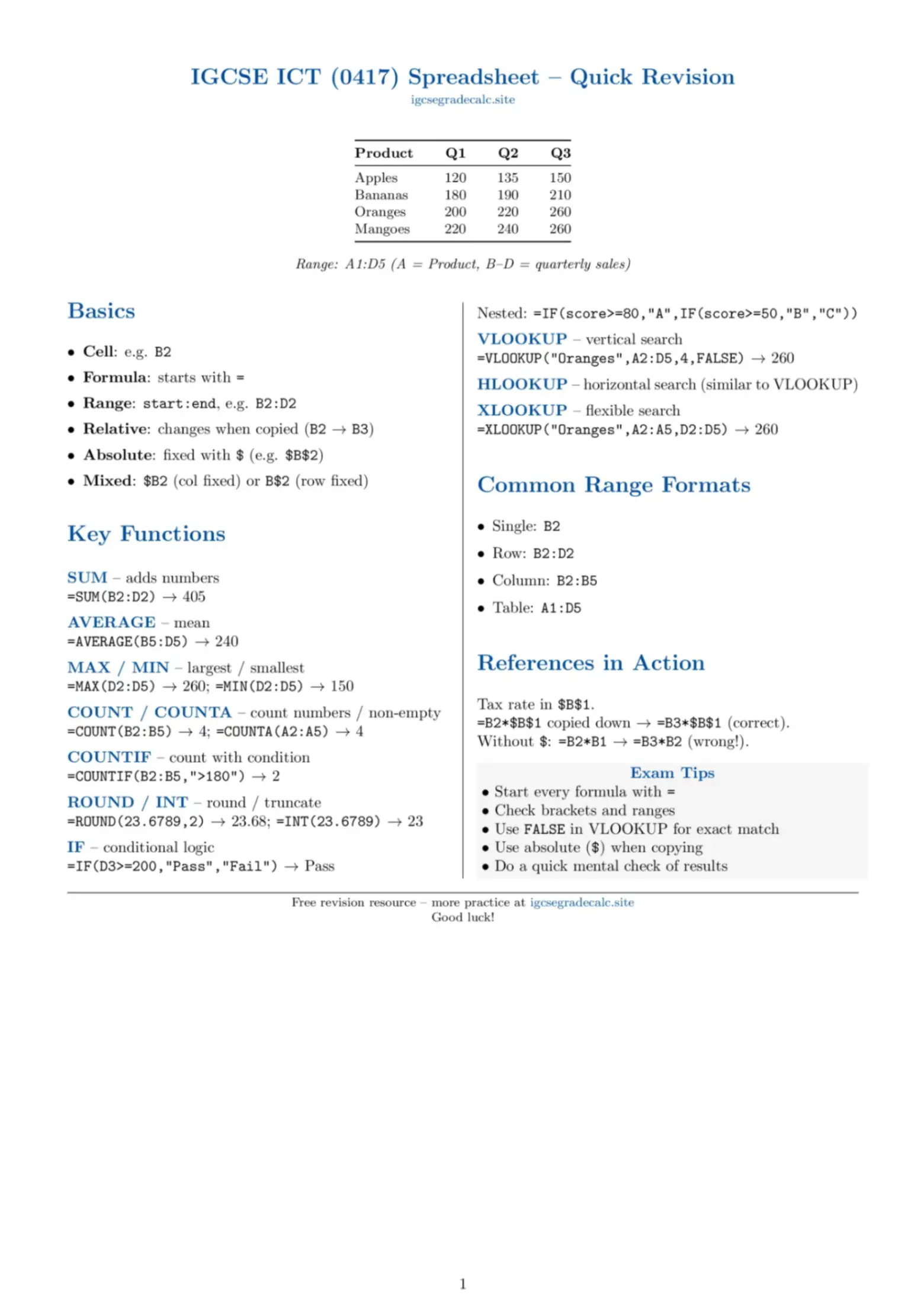
Module 5: Spreadsheet Engineering & Logic Functions
Spreadsheets convert raw records into dynamic, analytical tools through structured data engines and formulas.
5.1 Cell Referencing Mechanics
- Relative Referencing (
A1): The cell coordinate adjustments update relative to the destination cell when the formula is filled or copied across columns or rows. - Absolute Referencing (
$A$1): Locks the exact column and row coordinates. The targeted cell pointer remains fixed, preventing changes when the formula is copied elsewhere.
5.2 High-Density Core Functional Syntaxes Reference
A. XLOOKUP Function
A modern way to look up a value in a list and return a matching value from another list:
Example: Search for a student ID in cell B2 inside column A, and return their grade from column E. If not found, show "Not Found":
B. VLOOKUP Function
Searches for a value in the first column of a table and returns a value in the same row from another column:
Example: Look up the ID in B2 in the table A2:E500, and return the value from the 5th column (Exact match):
C. Nested IF Function
Checks multiple conditions in order by putting another IF inside the "False" part:
D. COUNTIF and SUMIF Functions
Used to count or add numbers only when they meet a specific rule:
Example: =COUNTIF(E2:E50, "Pass") or =SUMIF(C2:C50, "Fruit", D2:D50)
E. Basic Statistical Functions (SUM, AVERAGE, MAX, MIN)
Standard tools to calculate quick statistics for a range of cells:
F. ROUND Function
Rounds a number to a specified number of decimal places:
Example: Round the average score in F2 to 2 decimal places:
G. AND / OR Functions
Used inside an IF statement to check more than one condition at the same time:
Example: =IF(AND(D2>=50, E2>=50), "Pass Both", "Fail")